


Download 3D Flash Animator – animation software, vector graphics, game development, interactive content, Flash MX scripting
Overview
3D Flash Animator is a specialized productivity tool designed for creating Flash animations and interactive web content. The software caters to developers, designers, and digital artists seeking to produce dynamic visual experiences for online platforms. Its core purpose lies in enabling users to design engaging animations, develop interactive menus and buttons, and build simple games using a suite of integrated tools. The application supports vector graphics, 3D effects, text animations, and advanced scripting, making it suitable for both beginners exploring animation and professionals requiring robust features.
It addresses the need for a dedicated toolset that combines visual design with interactivity—particularly relevant in contexts where Flash-based content remains in use, despite the decline of Flash in modern web standards. Target users include multimedia developers, educators creating interactive presentations, and content creators aiming to deliver immersive web experiences. Although the developer did not provide additional technical details about their background, the software's focus on animation and game development suggests a specialized development team with expertise in multimedia tools.
Real-world use cases include creating animated banners, educational modules with interactive quizzes, and simple browser-based games. In the broader app ecosystem, 3D Flash Animator serves as a niche but valuable utility for legacy Flash content creation and preservation. Its continued relevance stems from its comprehensive feature set and ongoing updates, such as version 4.9, which emphasize performance and stability.
Key Features & Functionality
- Vector Graphics and Effects – The software supports gradients, textures, shadows, and 3D effects, allowing users to craft visually rich animations with scalable vector assets. This enables high-quality output suitable for web use without pixelation.
- Text Effects and Transitions – Users can apply 2D and 3D text effects, including motion blur and animated transitions, enhancing visual storytelling and typographic creativity in projects.
- Game Development Tools – Built-in velocity and acceleration features facilitate dynamic motion control, while support for Flash MX action scripting allows for complex interactivity and game logic implementation.
- Improved Performance and Interface – Version 4.9 introduces faster processing, reduced memory usage, and a more intuitive workspace, improving workflow efficiency and reducing system strain.
- Export Limitations in Trial – While the 7-day trial allows full access to editing features, exporting animations is disabled post-trial, requiring a paid license for final output.
For example, a designer could use vector tools to create a responsive animated logo, then apply 3D text effects to a title sequence. A developer might use Flash MX scripting to build a click-based puzzle game with physics-based movement. These capabilities demonstrate how each feature contributes to real-world animation and interactivity workflows.
Interface, UX & Performance
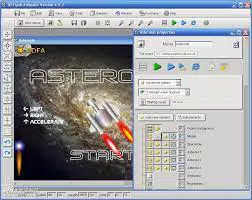
The user interface of 3D Flash Animator is structured around a workspace optimized for animation and design tasks. Layouts include tool panels, timeline controls, and preview windows, allowing users to manage layers, frames, and visual elements efficiently. The visual style emphasizes clarity and functionality, with intuitive icons and organized menus that support a streamlined workflow.
Navigation is designed to accommodate both new and experienced users, with accessible shortcuts and contextual tool access. Although the developer did not list formal performance metrics, version 4.9 is described as faster, more reliable, and memory-efficient, suggesting improvements in responsiveness and stability. The software is reported to run smoothly across different device categories, though specific compatibility details were not disclosed.
Responsiveness is maintained during complex operations such as rendering animations with multiple layers and effects. Stability has been enhanced in recent updates, with bug fixes addressing issues from prior versions. Users can expect consistent performance during extended design sessions, though actual results may vary based on system configuration.
Platform Compatibility & Technical Requirements
3D Flash Animator is available exclusively for the Windows platform. The current version, 4.9, has a file size of 105.5 MB, making it a lightweight download for users with moderate storage capacity. The software requires a Windows operating system, though specific minimum OS versions were not listed by the developer.
Compatibility information was not fully disclosed, so users should ensure their system meets general Windows application requirements. The lack of information on hardware specifications or supported Windows versions means that installation and operation may depend on individual system configurations. No details were provided about GPU acceleration, RAM requirements, or processor compatibility.
For users seeking to install the software, it is recommended to verify system compatibility before proceeding. The absence of iOS or Android support confirms its role as a desktop-only application.
Pros and Cons
Pros
- Comprehensive toolset for Flash animation and game development
- Supports vector graphics with 3D effects and textures
- Advanced text effects and motion transitions for visual impact
- Flash MX action scripting enables complex interactivity
- Performance improvements in version 4.9 with reduced memory usage
- Intuitive interface enhances workflow efficiency
Cons
- Export functionality disabled in the 7-day trial version
- No information on minimum OS or hardware requirements
- Available only for Windows, limiting cross-platform access
- Flash-based output may not be compatible with modern web standards
- Developer did not provide additional technical details
FAQ
Is 3D Flash Animator available for Android or iOS?
No, the software is only available for Windows. There is no official version for Android or iOS devices.
Can I use 3D Flash Animator to create games?
Yes, the software includes tools for game development, such as velocity and acceleration controls, and supports Flash MX scripting for interactive logic and game mechanics.
Is the trial version fully functional?
Yes, the 7-day trial allows full access to all features, including editing, effects, and scripting. However, exporting animations is disabled after the trial period.
What happens after the trial ends?
Without purchasing the full version, users cannot export their animations. All editing work remains accessible, but final output is restricted.
Is 3D Flash Animator secure to download?
While the developer did not provide security details, the software is distributed through official channels. Users should ensure downloads are obtained from trusted sources to maintain device safety.
Final Thoughts
3D Flash Animator stands out as a powerful desktop utility for creating Flash-based animations and interactive content. Its blend of vector design tools, text effects, scripting support, and performance enhancements makes it a compelling choice for developers and designers focused on legacy Flash projects. While the lack of cross-platform availability and export restrictions in the trial may limit accessibility, the software delivers strong value for its target audience.
Professionals in education, multimedia, and web development who still rely on Flash-compatible content will benefit most from its advanced features. The updated interface and improved efficiency in version 4.9 ensure a smoother experience, even on older systems.
For those seeking a dedicated tool to build interactive animations and simple games, 3D Flash Animator offers a robust solution. Download 3D Flash Animator now.


